Pix Battles Canva: Google Throws Down the Gauntlet in AI Design at I/O 2026
Google just sent a clear warning shot to popular design platforms everywhere. At its annual Google I/O event on Tuesday, May 19, 2026, the tech giant officially introduced Pix. This brand new, artificial intelligence-driven design and image generation app lives directly inside the Google Workspace ecosystem. Google designed the app to make professional graphic creation accessible to everyone, from a high school teacher planning a lesson to a small business owner launching a marketing campaign.
With Pix, you can generate an array of visual content using simple, everyday text prompts. It creates everything from social media banners and party invitations to marketing materials and product mock-ups. The tool completely removes the need for advanced photo editing skills or expensive third-party software. By giving users an instant, seamless path to create visuals, Google is picking a direct fight with industry giant Canva, as well as newer AI-native challengers like Anthropic’s Claude Design. The release signals that automated design is now a core battleground for tech giants, with massive implications for any business that relies on visual marketing.
Precise Editing Without the Headache
The new app is currently available to a select group of testers at I/O. Google plans to roll it out broadly to all Google AI Ultra subscribers later this summer. The platform aims to solve one of the biggest problems with modern generative AI: the frustration of fixing small mistakes in an otherwise perfect picture. Usually, if an AI image is almost right, changing a tiny detail requires you to write a completely new prompt and hope the system does not alter everything else. Pix changes this workflow by making generated images fully editable.
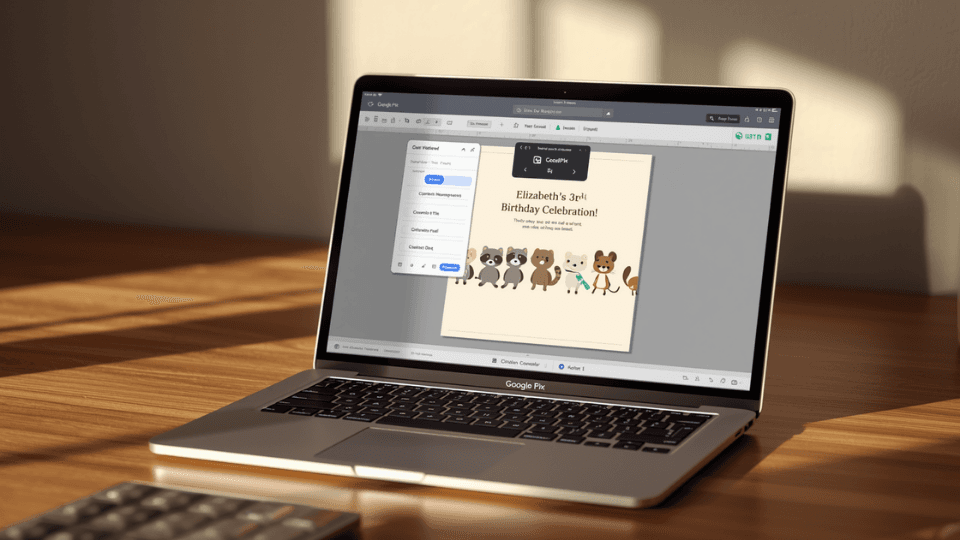
You simply type what you want, and Pix builds the layout. Gemini model architecture powers the underlying editing layer, converting every separate item in a generated design into an adjustable element. If you want to modify a single part of the picture, you do not have to rewrite your text. Instead, you can click on the specific element and leave a comment to tell the AI what to fix, just like giving feedback on a shared document in Google Docs.
Seamless Integration for Teams
You can also make manual edits directly on the canvas without using text prompts at all. For example, if you create a birthday invitation card but want to manually shift the event time from 5 PM to 6 PM, you can click and type the text change yourself.
The application runs on Google’s new Nano Banana 2 model. The company states this model is perfect for creative work because it excels at precise text rendering, understands spatial layouts, and manages complex visual outputs. Because Pix is a native part of Google Workspace, it makes team collaboration simple. Once you finish a project, you can download, copy, print, or share the files instantly. You can also pass the design link to a coworker so they can run a final round of edits before the project goes live. Google is making it clear that it wants to own the entire pipeline of creation, from basic emails to high-end company graphics.