Ride Smooth: Google Drops Android Update to Kill Motion Sickness and Boost Accessibility
Google announced five fresh Android updates built to make mobile screens easier to read, more accessible, and deeply personal. According to official company updates, the release introduces software features designed to ease car motion sickness, assist blind or low-vision users, help people track missing belongings, and bring new custom styling tools to Google Messages.
While some of these additions mirror features Apple recently launched on iPhones, Google integrated Gemini smart models across several tools to deliver cleaner functionality.
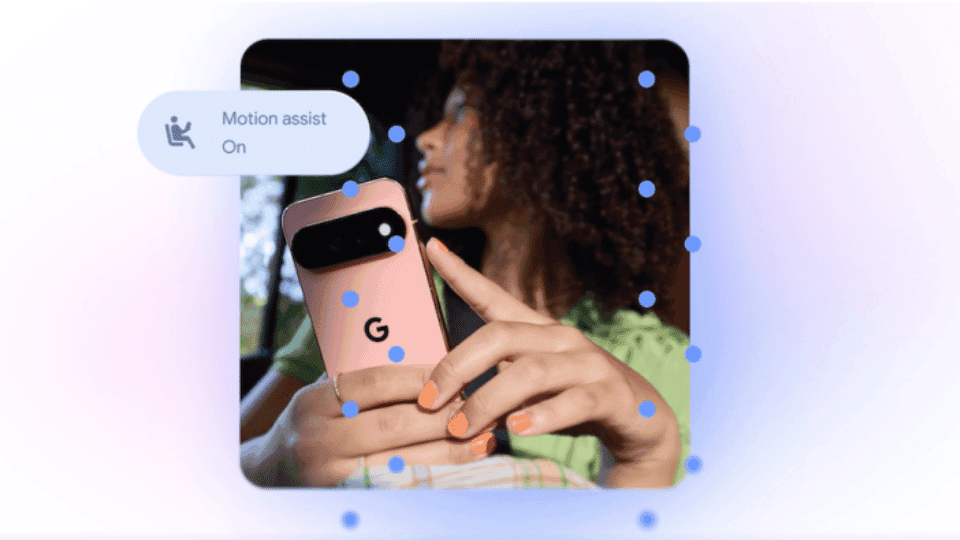
The most notable tool in this rollout is Motion Assist, a feature built to help people who feel sick while staring at phone screens in moving cars. The system displays animated visual dots along screen borders that shift automatically based on vehicle movement. Moving those screen dots helps bridge the sensory gap between what a user’s eyes see on the display and what their inner ear senses while traveling.
Apple launched a similar visual tool called Vehicle Motion Cues earlier in 2024. However, Google gives users deeper control over how those screen dots look. Android users can set Motion Assist to run automatically or switch it on manually. Custom settings allow phone owners to tweak dot shapes, background colors, and transparency levels. Google confirmed that Motion Assist is rolling out to mobile devices running Android 12 or newer.
Google is also expanding Guided Frame, an accessibility feature designed for blind and low-vision users. Guided Frame combines real-time camera feeds with Gemini models to help users read tiny text, scan restaurant menus in dim lighting, or identify household objects placed around a room.
The software offers real-time voice prompts to guide users when the camera drops out of alignment. Spoken directions tell the person to tilt the phone, move left, or tilt the camera back up. Google plans to bring Guided Frame to devices running Android 9 and above across all markets where Gemini operates.
Another practical update adds a specialized memory section to Gemini, helping people track where they put everyday personal belongings. Users can speak or type details directly into Gemini, recording specific notes like placing a passport inside a bedroom drawer. Later on, users can ask Gemini to find those stored locations. People can also attach reference photos to those notes, making items easier to locate.
Additionally, Google is adding Google Keep cards directly into Google Messages. This connection lets users view, edit, and share grocery lists, travel plans, or quick notes without switching back and forth between separate apps.
Google Messages is also receiving fresh visual options. Users can customize personal chats using custom color palettes, background photos, and unique themes. The messaging tool automatically matches chat bubble colors to chosen background themes, creating a unified look across conversation feeds.